An Old Router With 4 MB of Flash
I have an old TP-Link TL-WR740N v5 with DD-WRT on it. It’s an Atheros AR9330 (the router’s own /proc/cpuinfo says so; OpenWrt calls the board ar9331, same family) with a MIPS 24Kc CPU, 2.4 GHz Wi-Fi and a 5-port 10/100 switch all in one chip, 4 MB of SPI flash and 32 MB of RAM. It came off the shelf because of a bug.
How It Started: Two Sleepy PHYs
I was chasing an Ethernet problem on an embedded Linux board. Disable the switch port, enable it again, and the link never came back. Not slow, never. But only with certain routers. With the router on my desk it worked every single time, which is the most annoying kind of bug.
The cause turned out to be a power-saving feature called energy-detect power-down (EDPD). With EDPD on, a PHY that loses its link goes to sleep and only wakes up when it hears energy on the cable. That is fine as long as the other side talks first. Some switch ports also go to sleep when nobody is there. If both sides sleep and wait politely for the other one to say something, nobody ever says anything. Deadlock.
Upstream Linux already knows this. The SMSC PHY driver turns EDPD off when the PHY has an interrupt line:
/* don't use EDPD in irq mode except overridden by user */
if (!priv->edpd_mode_set_by_user && phydev->irq != PHY_POLL)
	priv->edpd_enable = false;
The board’s driver skipped that step, so EDPD stayed on. If you see something similar, check it on the running system and switch it off until the next reboot:
ethtool --get-phy-tunable eth0 energy-detect-power-down
ethtool --set-phy-tunable eth0 energy-detect-power-down off
My desk router talks first, so it could never reproduce the bug. I needed a partner that sleeps, and the TL-WR740N does: the AR9330’s switch PHYs have a hibernation mode that is on by default (bit 15 of Atheros PHY debug register 0x0B). With the board’s EDPD on, the link stayed dead for over a minute. With EDPD off, it came back in about 2 seconds.
One more thing I learned the hard way: pulling the cable does not reproduce it, because plugging it back in wakes the router. Powering down the board’s PHY from software does (bit 11 of the MII control register, BMCR). Leave the cable in, power the PHY down for 30 seconds, the router’s port falls asleep within a second or so, then power it back up and watch.

So the router got a job.
DD-WRT did that job, but I wanted more: tc netem for bad-network tests, iperf3, tcpdump, ethtool, modern Wi-Fi security modes for client tests, and SSH with an ed25519 key. There is no official OpenWrt image for the v5. The ImageBuilder could only give me a wired-only image; even the ath9k driver alone did not fit. So I built OpenWrt 24.10.8 from source and trimmed it until it did fit.
The other problem: I do not have a serial adapter wired to it, and I did not want to open the case. Flashing a 4 MB router blind sounded like a good way to get a new paperweight.
This post is about five things:
- Flashing it safely without serial, by reading the bootloader’s TFTP recovery code out of a flash dump.
- A measured size table: what each change saved, in bytes, on a 4/32 device.
- Testing the image in QEMU before flashing, and two gotchas that made tests pass when they should not.
- A small web UI without LuCI.
- What actually happened: the first flash booted with a dead LAN, QEMU had a blind spot exactly there, and I got back in through OpenWrt’s failsafe over another board’s serial console.
Short version of the ending: it works now, Wi-Fi included, and the switch ports still fall asleep, which was the whole point.
Precautionary Measures
Please do not blame me if you brick your router. Proceed only if you know what you are doing. I do not claim I do, but, whatever…
OpenWrt is on the router now and works. The TFTP recovery in the first half of this post was read out of the flash dump and checked statically, and it ran on the router only at the very end, after everything else. It worked, once, on one router, with one image. What I used for the first flash and the first recovery is in “The First Flash” and “Getting Back In” further down.
Two regions of this flash must never be written:
0x000000to0x01ffff: U-Boot plus a 64 KiB sector with the MAC address, WPS PIN and product ID. Lose it and you need an SPI programmer. You also lose the TFTP recovery, because that code lives there.0x3f0000to0x3fffff: ART, the Wi-Fi calibration data. It’s unique per unit. There is no copy of it anywhere except on your router and, hopefully, in your backup.
Flashing Without Serial
1. Dump Everything First
DD-WRT gives you root over SSH, so the full flash is one dd away:
ssh root@<router> 'dd if=/dev/mtdblock6' > fullflash.bin   # mtd6 is the whole 4 MiB on DD-WRT
ssh root@<router> 'md5sum /dev/mtdblock6'                   # compare with your local md5sum
I dumped every mtd partition the same way and checked that each one is an exact slice of the full dump. That also gave me the real flash map, because DD-WRT’s partition names are misleading. The partition it calls uboot-env is not a U-Boot environment at all: it’s all 0xff except the MAC at 0x1fc00, the product ID at 0x1fd00 and the WPS PIN at 0x1fe00.
| Range | What |
|---|---|
0x000000 to 0x00ffff | U-Boot 1.1.4 |
0x010000 to 0x01ffff | MAC, product ID, WPS PIN |
0x020000 to 0x3dffff | Firmware (0x3c0000 bytes, TP-Link header + kernel + squashfs) |
0x3e0000 to 0x3effff | DD-WRT nvram |
0x3f0000 to 0x3fffff | ART (Wi-Fi calibration) |
Keep a second copy of these files somewhere other than your PC.
2. Read the Recovery Code
TP-Link’s U-Boot on these units has a TFTP recovery: hold the reset button while powering on and it fetches a file from a TFTP server. The internet has plenty of guesses about the file name, IP addresses and which file sizes it accepts. I wanted the actual rules, so I read them out of the dump.
The second stage of U-Boot is an LZMA uImage inside the first 64 KiB (look for the 27 05 19 56 magic). Unpack it, load it at 0x80010000 and run strings and a disassembler over it. I used Capstone plus a small script to resolve the $gp-relative string loads, because MIPS PIC code loads every string through the GOT and a plain disassembly tells you nothing.
What the routine does, in pseudo-C:
if (reset_button_held()) {                  /* GPIO11, debounced */
    led_on(); udelay(2000000);
    setenv("ipaddr",   "192.168.0.86");
    setenv("serverip", "192.168.0.66");
    run_command("tftp 80800000 wr740nv5_tp_recovery.bin");   /* result not checked */
    /* 8 bytes in flash at 0x1fd00 vs 8 bytes at file offset 0x40 */
    if (memcmp((void *)0x9f01fd00, (void *)0x80800040, 8)) {
        puts("auto update firmware: product id verify fail!");
        goto normal_boot;                   /* nothing written */
    }
    if (filesize == 0x3c0000)               /* bare firmware */
        run_command("erase 0x9f020000 +3c0000; cp.b 0x80800000 0x9f020000 3c0000");
    else if (filesize == 0x3e0200)          /* stock image with boot block */
        run_command("erase 0x9f020000 +3c0000; cp.b 0x80820200 0x9f020000 3c0000");
    do_reset();                             /* any other size: reset, nothing written */
}
The size checks look like this in the listing:
0x8001830c lui $v0, 0x3c              # 0x3c0000
0x80018310 bne $s0, $v0, 0x8001832c
...
0x8001832c lui $v0, 0x3e
0x80018330 ori $v0, $v0, 0x200        # 0x3e0200
0x80018334 bne $s0, $v0, 0x8001835c
The good news is in what it does not do. It only ever writes 0x020000 to 0x3dffff. It never touches U-Boot, the MAC/ID sector, the nvram or ART. A wrong product ID boots the old firmware, and a wrong size resets without writing. The environment is compiled in (Using default environment, no saveenv), so there is no stale env in flash that could change any of this.
Also found: U-Boot 1.1.4 from July 2016, prompt hornet>, bootdelay=1, and a default mtdparts in its bootargs that has nothing to do with this flash layout. The kernel ignores it, but it confused me for a while.

3. Make a Recovery Image From What’s Already There
The firmware partition DD-WRT is running from is exactly 0x3c0000 bytes, it starts with a TP-Link v1 header, and that header carries the product ID 07400005 00000001 at offset 0x40. In other words, the live firmware is already in the exact format the recovery accepts. Cut it out of the dump:
dd if=fullflash.bin of=wr740nv5_tp_recovery.bin bs=64k skip=2 count=60   # 0x020000, 0x3c0000 bytes
xxd -s 0x40 -l 8 -p wr740nv5_tp_recovery.bin                             # 0740000500000001
Now I have a known good file that puts the router back exactly how it was (minus the nvram, which recovery does not touch anyway).
The OpenWrt factory image for this board is also 0x3c0000 bytes with the same ID at 0x40. The sysupgrade image is 0x380338 bytes, which falls into the “reset, nothing written” branch. So: factory image for TFTP, never sysupgrade.
4. Prove Recovery First
The plan has two runs, and the second one only happens if the first one works.
- Run 1 flashes the DD-WRT backup through TFTP recovery. If it works, the router comes back as before, and I know the button, the port and the file name are right. Afterwards I check the md5 of the firmware partition over SSH against the backup.
- Run 2 flashes the OpenWrt factory image the same way.
I wrapped it in a script that refuses anything that U-Boot would not accept:
SRV=192.168.0.66; RTR=192.168.0.86
NAME=wr740nv5_tp_recovery.bin
SIZE=3932160; ID=0740000500000001

fid=$(xxd -s 0x40 -l 8 -p "$FILE")
[ "$fsize" = $SIZE ] || die "wrong size. U-Boot would restart without writing."
[ "$fid" = $ID ]     || die "wrong product id."
It also checks the sha256 against the two files I expect, puts 192.168.0.66/24 on the wired interface, and runs dnsmasq as a TFTP-only server (--port=0 turns DNS off) with tcpdump next to it, so I can see the ARP request, the read request and the data blocks as they arrive. After the transfer the script waits two and a half minutes for the router to erase, write and restart. On my router the write and restart fit inside that wait (see below). Do not pull the power during that time.
That was the plan. I did not follow it. More on that below. Run 1 did happen in the end, sort of, but it was not a TFTP test: I never started the script. I pulled the power, held the button, plugged the power back in, waited a while and let go. At first only the power LED was on, then the system LED (the gear icon between Wi-Fi and power) blinked fast. With no TFTP server at 192.168.0.66, U-Boot wrote nothing and booted the firmware in flash. The button was still held when OpenWrt’s preinit ran, and OpenWrt took that as a request for failsafe. That is what the fast-blinking system LED means. Run 2 never happened; the OpenWrt image went on another way.
So TFTP recovery was untested, not failed. Done properly, the script runs first and prints TFTP listening, and only then does the button go down, for about 5 seconds.
5. Doing It Properly
The next night I did. By then OpenWrt was on the router, so I skipped the DD-WRT backup and served the OpenWrt factory image. It goes through the same U-Boot code with the same size, and the router ends up where I want it. DD-WRT would have come back with default settings anyway, because OpenWrt’s overlay had taken over its nvram block.
I also stopped moving cables around. A USB dock gives my PC a second Ethernet port. That port now has its own cable to a router LAN port, and the script only touches that interface. My wired LAN, the VPN and the Wi-Fi stay as they are, so I keep my internet during the flash.
What happened:
- I started the script and waited for
TFTP listening. - Power out, hold the reset button, power in, count to 5, let go.
- 20 seconds later the router showed up as 192.168.0.86 and asked for
wr740nv5_tp_recovery.bin. The cable was in LAN 2, and U-Boot answered there. I did not try the other ports. - The 3.75 MiB transfer took 10 seconds.
- Then the script waits its two and a half minutes. The link went down and up twice in the first 45 seconds, then stayed up. When the wait ended, OpenWrt answered ping at once and SSH a second later. So the real erase, write and restart takes less than that; I did not measure it closer.
Afterwards I compared the flash with the file over SSH. The firmware area up to the start of the overlay matched the image byte for byte, and U-Boot and ART still matched my dumps. The router came up with the settings from my first-boot script and a new SSH host key, as you would expect after a factory image.
So 5 seconds on the button is enough, and it is short enough that OpenWrt does not see the press and go to failsafe. That was the mistake in my first try.
Fitting OpenWrt 24.10 Into 4 MB
On this board, kernel plus rootfs may use 3,670,016 bytes. That is the 0x3c0000 firmware area minus 256 KiB that mktplinkfw keeps back for the writable overlay. Stock 24.10.8 defaults came out at 5,193,361 bytes, 1.5 MB over.
I made each change on top of the previous one and rebuilt, so every number below comes from a real image, not a guess. I sorted the table by savings, but I measured the changes in a different order, and some numbers would move a bit if you did them in another order.

All the changes, in bytes
| Change | Saved (bytes) |
|---|---|
| Drop firewall4/nftables, ppp, odhcp6c/odhcpd, opkg, usign, ca-bundle, uclient-fetch, urngd, ujail; wpad replaced by hostapd | 1,020,393 |
| Kernel trim round 1 (no PCI, USB, netfilter, BPF syscall, unused drivers; SLUB_TINY, BASE_SMALL) | 393,141 |
| Squashfs block size 64 to 256 KiB | 119,858 |
| IPv6 off (kernel and packages) | 110,479 |
Ship only libmbedcrypto, link hostapd with -lmbedcrypto | 85,854 |
| Stack protector, FORTIFY_SOURCE, RELRO, seccomp off | 70,487 |
| mac80211 mesh and debugfs off, ATH_DFS off | 70,324 |
| CONFIG_BUG=n | 56,684 |
| kmod-netem depends on kmod-sched-core only | 40,962 |
mbedtls -Os, P-256 only, no DES, no TLS 1.3 | 30,944 |
| Busybox: 20 applets off (udhcpc, swap tools, less, brctl, …) | 25,928 |
| Debugfs, sysrq, printk time, multicast routing off | 25,884 |
| Kernel round 2 (no initrd, no ethtool netlink, no SYN cookies, 16 KiB log) | 20,851 |
| kmod-crypto-ctr without the IPsec-only crypto it pulled in | 14,836 |
| hostapd: ACS, MBO, wired driver, preauth, airtime policy off | 9,344 |
| dnsmasq: no TFTP, loop detection, inotify, dumpfile | 6,384 |
| Dropbear: ed25519 on, ECC/U2F/client/agent/zlib off | 6,016 |
--gc-sections | 524 (rejected) |
The config of each measured step is in build/seeds/ in the repo.
The final image is 1,312,886 bytes of kernel plus 2,352,458 of rootfs. Counting the 512-byte header and the kernel’s 4-byte alignment, that is 4,158 bytes under the limit. It was about 15 KB before I had to put one kernel option back (see “The First Flash”). The writable overlay is 324 KiB. It has ath9k with WPA2, WPA3-SAE, 802.11r and OWE, dropbear with ed25519 and RSA, tc with netem, iperf3, tcpdump-mini, ethtool, mdio-tools, and the web UI below. Two builds of the same config gave bit-identical images.
What does not fit: LuCI. A minimal LuCI costs about 350 KB, and with the tools I wanted it ends up about 300 KB over. Even 1 MiB squashfs blocks (another 80 KB, and 3 to 4 MiB of RAM for caches) do not close that gap.
Things I tried that did not work: LTO does not build (MIPS16 shared objects fail with R_MIPS16_26 relocation errors), tuning the kernel’s LZMA parameters saved 324 bytes, and iwinfo cannot go because netifd’s Wi-Fi script uses it.
The Near-Brick
The kernel trim was the second biggest win, and it also almost killed the router. In the first round I turned off every SPI and PHY/switch driver I thought was unused. Two of them were not:
CONFIG_SPI_AR934X: the AR9330 device tree says its SPI controller isqca,ar934x-spi. The driver I kept (spi-ath79) only matchesqca,ar7100-spi. No flash driver means no MTD, no rootfs, kernel panic, and withPANIC_TIMEOUT=1a reboot loop.CONFIG_AR8216_PHY: the built-in switch isqca,ar7240swand onlyar8216.cdrives it. Without it, no Ethernet.
None of my QEMU tests could catch this, because QEMU does not emulate this SoC. A review pass before flashing caught it. Putting both back cost 8,480 bytes of kernel.

After that I wrote a small static check, and I would run something like it on any trimmed kernel: unpack the kernel from the firmware image, find the appended device tree (d00dfeed), and for each enabled node check that at least one of its compatible strings appears somewhere in vmlinux (outside the DTB) or in one of the shipped modules. On the final image the only nodes left without a match are the board root, the CPU, the DDR controller (used through a phandle) and the disabled USB nodes.
Testing Before Flashing
QEMU cannot run the real kernel, but it can run the same userspace on the same CPU family. I built OpenWrt’s malta/be target (big-endian MIPS 24Kc) with the same packages and overlay, gave it 32 MB of RAM and mac80211_hwsim for virtual radios, and ran two test suites against it: one for the base system (Wi-Fi modes, netem, SSH, overlay, memory) and one for the web UI including some abuse tests.
Final runs: 23 PASS in the base suite and 45 PASS in the web suite, nothing failed. Idle memory available was about 5.5 MB with the AP and a test client up. The stock malta kernel leaves about 6.5 MB less free RAM than my trimmed router kernel should, so the router ought to do better than that.
Two bugs from this phase are worth sharing.
Wi-Fi Tests That Passed Without an AP
wifi config picks the highest band the radio supports. hwsim supports every band, so it generated 6 GHz radios. On 6 GHz, hostapd refuses an open network:
Pre-RSNA security methods are not allowed in 6 GHz
So the AP interface existed, hostapd had died, and the interface was never in the bridge. My early tests only read the uci config and iw dev, both of which looked fine. Passing tests, no AP.
The fix was to set the band explicitly in the first-boot defaults, which matches what the real ath9k radio gets anyway:
uci set wireless.radio0.band='2g'
uci set wireless.radio0.htmode='HT20'
uci set wireless.radio0.channel='1'
uci set wireless.default_radio0.encryption='none'
And the tests now check that the AP is up, in the bridge, and that a client actually associates.
busybox awk and the Ternary
This one:
printf "...", NR > 1 ? "," : ""
In busybox awk the > is parsed as an output redirection, not a comparison. My log and DHCP-lease endpoints returned [] and quietly wrote one file per log line into the CGI directory, each named after the rest of the expression. Parentheses fix it. A test now checks that the CGI directory holds only the scripts.
Other busybox surprises on the way: no flock -w (I loop on flock -n), no pkill, no stat. And after a probe build you need make package/busybox/clean, or stale applet symlinks end up in the image.
A Web UI Without LuCI
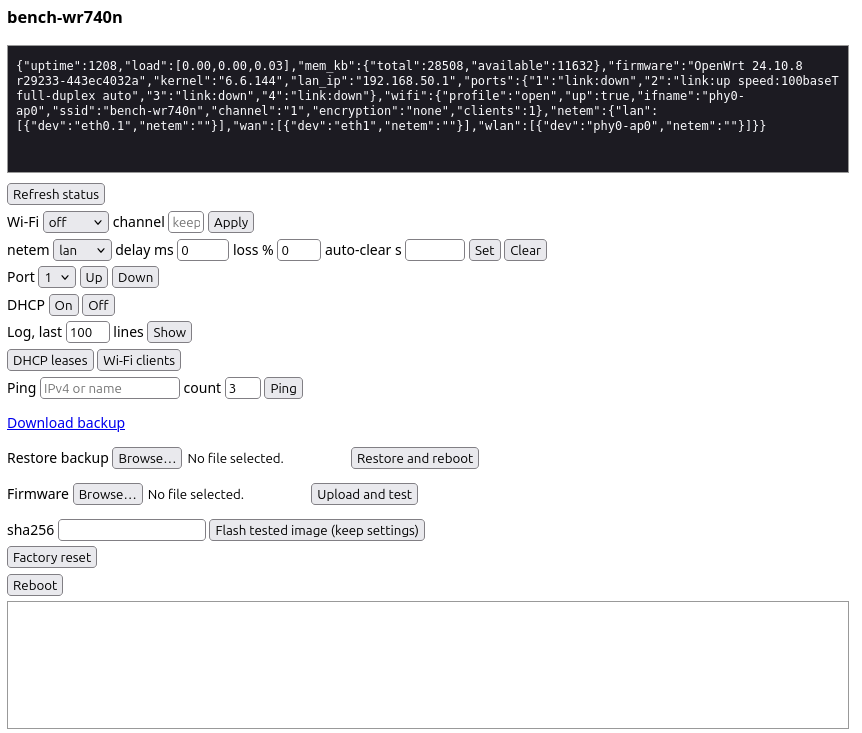
LuCI does not fit, but I still wanted to change Wi-Fi settings or add packet loss from a phone. Busybox already has an httpd applet. With CGI and basic auth it cost 4,232 bytes of rootfs, against 18,304 for a stripped uhttpd.
The UI is one HTML page plus 14 small POSIX sh CGIs: status, wifi, netem, port, dhcp, log, leases, clients, ping, backup, restore, upgrade, reset, reboot. Scripts, init file and page are about 21 KB uncompressed; httpd, the UI and the Wi-Fi defaults together cost 12,736 bytes of squashfs. It is started by procd:
procd_set_param command /bin/sh -c 'echo 1000 >/proc/self/oom_score_adj; exec /usr/sbin/httpd -f -p "$0" -h /www-bench -c /etc/benchweb/httpd.conf -r bench' "${ip%%/*}:80"
oom_score_adj 1000 means that if someone floods it, the kernel kills httpd first and not hostapd. In the QEMU flood test that is what happened: only httpd got killed.
A CGI looks like this (netem, shortened):
#!/bin/sh
. /usr/lib/benchweb.sh
need POST; form
i=$(arg iface); dl=$(arg delay_ms); ls=$(arg loss_pct)
case "$i" in lan|wan|wlan) ;; *) bad iface;; esac
num "${dl:-0}" 0 5000 || bad delay_ms
num "${ls:-0}" 0 100  || bad loss_pct
lock
for x in $(devs $i); do
	tc qdisc replace dev $x root netem delay ${dl:-0}ms loss ${ls:-0}%
done
Since the Wi-Fi is an open bench SSID, the shared helper does the boring safety work: basic auth on every URL with a random password generated at first boot, request must come from the LAN subnet, Host must be the router’s IP (against DNS rebinding), Origin must be empty or the router (against CSRF), a whitelist for parameter characters, no eval, GET only reads and POST only changes. There is no TLS, so the password goes over the air in clear text on that open SSID. It’s a bench router, I can live with that.
On the real router it works: the page, all the read endpoints, ping, netem, DHCP on/off, port down/up on an empty port and a Wi-Fi profile change, plus the cross-origin and Host checks. A netem delay of 50 ms from the page showed up as 50.7 ms ping. One quirk: the page shows the Wi-Fi profile as “unknown” until the first change from the UI, because my first-boot script names the Wi-Fi section differently from what the CGI manages. I did not test reset, restore and upgrade on the real thing, on purpose.
This is the page. Not pretty, but every button does what it says. The box at the top is the status JSON as the router sends it.
The First Flash: A Dead LAN
I broke my own “prove recovery first” rule. I wanted the router ready by morning, nobody was at the desk, and DD-WRT gives you root and an mtd tool. The factory image is byte for byte what the TFTP recovery would copy to flash, so I wrote it from DD-WRT over SSH:
cat factory.bin | ssh root@<router> 'cat > /tmp/fw.bin'
ssh root@<router> 'md5sum /tmp/fw.bin'                    # compare first
ssh root@<router> 'nohup mtd -f -r write /tmp/fw.bin linux >/tmp/mtd.log 2>&1 &'
DD-WRT overwrites the squashfs it runs from while doing this, so a crash halfway would have left half an image. It did not crash. About 40 seconds later the router rebooted into OpenWrt.
Half of it worked. My Wi-Fi network showed up with the right name and channel, and my PC associated with it. The BSSID was the router’s real MAC, so at least the MAC sector was read fine. And then nothing. No ARP reply from the router, no DHCP on the cable, no address on either side. A router that beacons and ignores you.
Why
In the kernel trim I had turned off CONFIG_BRIDGE_VLAN_FILTERING. No VLAN filtering on my bridge, so why keep it? Because netifd creates every bridge with one netlink message, and that message always carries IFLA_BR_VLAN_FILTERING, even when the value is 0:
nla_put_u8(msg, IFLA_BR_VLAN_FILTERING, !!cfg->vlan_filtering);
With the option off, the kernel’s stub for it refuses any value, 0 included:
static inline int br_vlan_filter_toggle(struct net_bridge *br,
					unsigned long val,
					struct netlink_ext_ack *extack)
{
	return -EOPNOTSUPP;
}
The kernel deletes the new bridge and returns the error. netifd logs Error adding bridge 'br-lan': -10 at debug level only and gives up on the LAN. No br-lan, no 192.168.1.1, no DHCP. Wi-Fi and the cable both hang off br-lan, so both were silent.
Then why did the AP beacon at all? hostapd is told bridge=br-lan, does not find it, and creates a bare bridge on its own with the old ioctl, which never sends that attribute. So there was a br-lan, with the radio in it and no address. Clients associate and talk to nobody.
Putting the option back cost 10,026 bytes, which is why the margin above is only about 5 KB now.
QEMU’s Blind Spot
All my tests passed, including one that checks br-lan. Two reasons, both obvious afterwards:
- The QEMU image runs the stock malta kernel, not my trimmed router kernel. Stock 24.10 has
CONFIG_BRIDGE_VLAN_FILTERING=y. My userspace was tested, my kernel config was not. - The bridge test looked for a
br-lanwith the AP in it. hostapd’s bare bridge passes that check.
My pre-flash audit also had this option on its “safe to cut” list, with the reason “bridge VLAN filtering is only generated for DSA boards”. That is true for the uci config and wrong for what netifd sends.
To be sure about the cause before flashing again, I applied the router’s networking trim to the malta kernel and ran the tests on it. With the option off: Error adding bridge 'br-lan': -10, and the LAN tests fail. With it on: everything passes. So QEMU could have caught it, if it had run my kernel config.
What I check now on a trimmed kernel: for every option I turn off, look at what userspace sends to the kernel unconditionally (netifd’s bridge setup is one netlink message with a dozen attributes), not only at what my config turns on. And a bridge test has to check that the Ethernet port is in the bridge and that the LAN has its address, not just that a bridge exists.
Getting Back In
So in the morning I held the button at power-on, meaning to do run 1, and ended up in OpenWrt failsafe instead (see above for why). That was lucky, because failsafe does not need the bridge. In failsafe OpenWrt does not start netifd at all. It puts 192.168.1.1 straight on the LAN port and starts dropbear, and my key was already in the image.
The catch: failsafe is only on the cable, and my PC was not cabled to the router. Another Linux board with a serial console was. It was cabled to the router from my earlier link tests, and its console was on a USB serial adapter on my PC. So I tunnelled SSH through the serial line.
On the board, through its console, nc connects to the router and the line is switched to raw mode so it passes binary data:
dmesg -n 1                                  # keep kernel messages off the console
ip addr add 192.168.1.250/24 dev eth0
stty raw -echo; nc 192.168.1.1 22; stty sane
On the PC, a small Python script is the SSH ProxyCommand. It types the line above into the console, waits for the echo, and then copies bytes between SSH and the serial port (921600 baud in my case):
ssh -o ProxyCommand="python3 sertun.py %h %p" root@192.168.1.1
It is slow, but SSH does not care what carries it, and the 3.7 MB sysupgrade image went through it fine. Failsafe has no Wi-Fi, so this time the sysupgrade image is the right file, not the factory one: OpenWrt is already on the flash and keeps its own partition layout.
Two gotchas in failsafe:
sysupgrade -T image.binrefused the image. On this target an image must list the board it supports, and sysupgrade compares that with/tmp/sysinfo/board_name. That file was empty. The device tree knows the board, so I wrote it by hand:echo tplink,tl-wr740n-v5 > /tmp/sysinfo/board_name. Then-Tpassed.- Plain
sysupgradein failsafe goes through ubus, and that fails there.FAILSAFE=1 sysupgrade -n image.bintakes the direct path.
A few minutes later the fixed image was up: br-lan with the Ethernet port and the AP in it, the LAN address from my first-boot script, DHCP leases on the cable, and SSH over Wi-Fi.
The empty board_name turned out to be my own fault, and not only in failsafe. OpenWrt fills it at boot with strings /proc/device-tree/compatible, and strings is one of the 20 busybox applets I cut. So on my image sysupgrade refuses every valid image until you write that file by hand, and no LED config gets generated. It is the next thing to fix in the image.
Then It Worked
What I checked on the real router after the fixed image came up:
- The LAN with the Ethernet port and the AP in the bridge, DHCP on the cable, SSH with key only (password login refused).
- The switch: the port with the board at 100 Mbit/s full duplex.
- Wi-Fi with the real calibration data: my PC at -44 dBm on channel 1, HT20.
iperf3for 10 seconds gave 49.3 Mbit/s router to PC and 42.5 Mbit/s back. - The tools:
iperf3,tcpdump,ethtool,tcwith netem (100 ms added delay showed up as 100.7 ms ping) andmdio. - Memory and flash: about 13 MB available, 44 KiB of the 324 KiB overlay used. Settings, web password and SSH host key survived a reboot.
- And the reason the router is on my desk at all: under OpenWrt the switch PHYs still hibernate. Debug register
0x0Breads0xbc00on all five PHYs, the same value as under DD-WRT, and idle ports report the sleep bit. My link test with the sleepy board passed: the router’s port was asleep, the link came back 2.5 seconds after the board powered its PHY up.
One thing to know if you reuse my MDIO tool: under DD-WRT the switch PHYs were reachable through eth0, under OpenWrt eth0 is a fixed link to the switch and reads 0xffff. The PHYs are on eth1’s MDIO bus there.
What I Did Not Figure Out
- Whether U-Boot also listens on the other LAN ports and on WAN. It answered on LAN 2, where my cable was, and I left it there. I also did not watch the LEDs during recovery.
CONFIG_BUG=nboots fine on real hardware and has not caused trouble so far. With it off, aBUG()would just hang instead of printing an oops, so I would not know if one hit.- Whether U-Boot checks the header md5 at
bootm. It matters for RAM-booting an initramfs over serial, which I have not needed (yet). - The overlay is 324 KiB, right at the JFFS2 minimum with 64 KiB erase blocks. 44 KiB are used after the first boot and my tests. Whether that stays comfortable I will see.
That’s All
The router runs OpenWrt 24.10 with Wi-Fi, netem, iperf3 and a web UI in 4 MB, and its ports still sleep. Was recovery-first worth it? I skipped it, and the first flash came up with a dead LAN. What saved me was OpenWrt’s failsafe, which I had listed as a fallback and never tried, plus a serial console that happened to be on the right board. The TFTP recovery I spent half this post on came last. When I finally ran it properly, it did exactly what the disassembly said, on the first try. Now it is my plan A for getting the router back, and it needs one cable and a button.
It was a fun journey for me. The router survived, so the next post will be about what it does on my desk, not about SPI programmers.
Links
- This post’s repo: build config, size tools, TFTP recovery script, the web UI and the QEMU tests
- OpenWrt Table of Hardware page for the TL-WR740N
- OpenWrt build system usage and the Image Builder
- OpenWrt failsafe mode, factory reset, and recovery mode
- OpenWrt on TFTP: installing OpenWrt via TFTP and TFTP recovery over Ethernet
- OpenWrt
ath79target source (target/linux/ath79) - OpenWrt in QEMU, including the
maltaimages - mac80211_hwsim, the kernel’s simulated Wi-Fi radios
- BusyBox
httpd - Capstone disassembly framework
Please send an email to gedizaydindogmus[at]gmail.com if you see something wrong, notice a typo, or just to say hello!